Connect it once. Then it just runs.
Your accounts are read on a schedule you set, every mailbox is triaged in one pass, and your board is waiting when you next pick up your phone. You do not have to open the app for it to work.
It runs without you.
Connected is triggered by your Claude account’s own Routines — they fire the triage a few times a day on the plan you already pay for. There’s no better routine than your Claude Routine.
Private runs in your own Anthropic account, called from your device with your own key — in the foreground, and in the background on a schedule your phone grants. That is the trade: only a device holding your key can start a run, so nothing starts it but your device. Force‑quit the app and it waits for you.
And because the run happens in your Claude account, it is a conversation you can carry on. Open the run that surfaced a task and ask it why, or what the email said, or to draft the reply — it still has your mailbox connected. Tell it something it had no way of knowing and it will update your board there and then. Most assistants hand you a list and stop. This one is still on the other end of it.
Connected asks for a one-off setup inside your Claude account — connectors first, then the routine. Here is exactly what that involves → Either way you can hit Run Routine yourself and watch it work. Want it running with the app closed? That’s Connected.
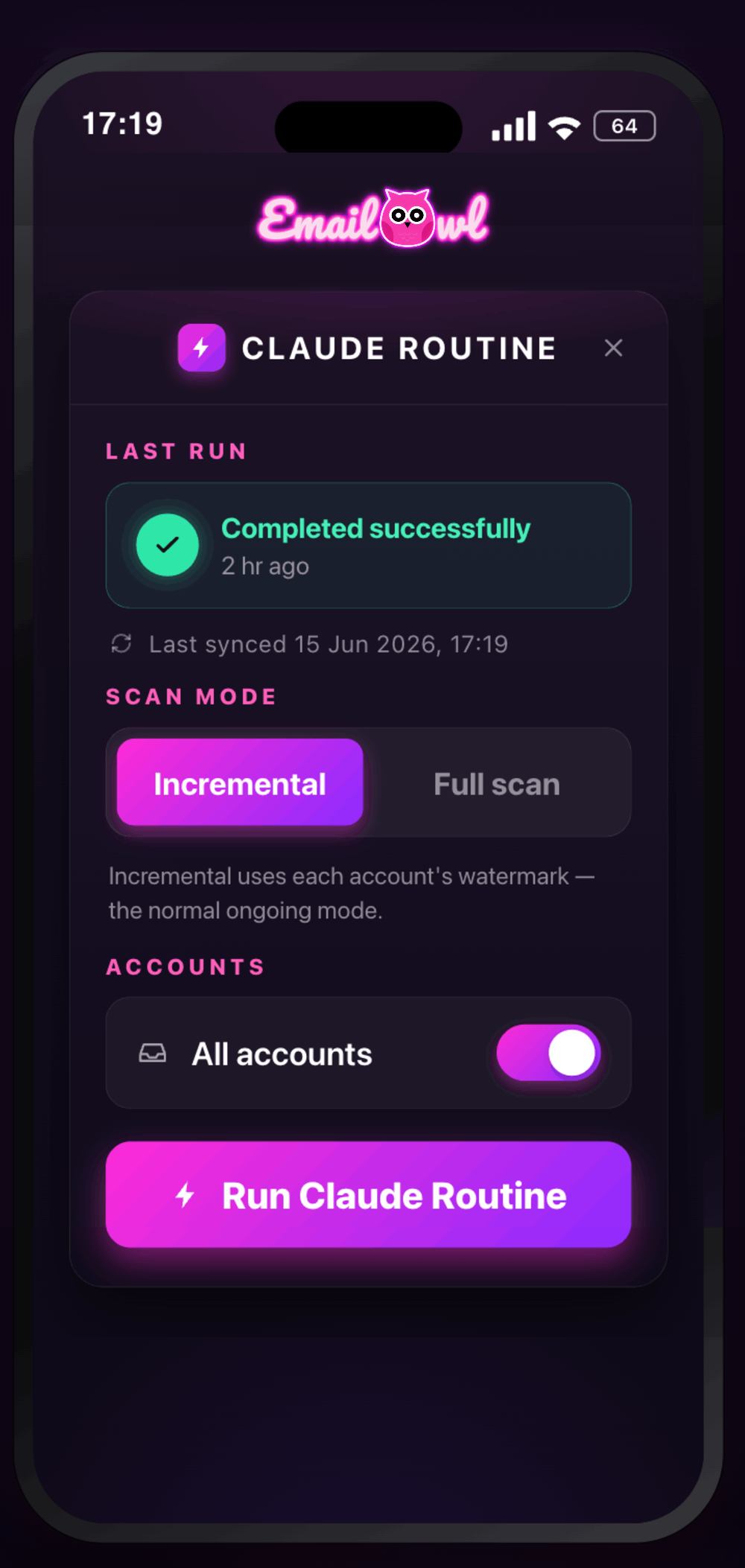
Your inbox, on autopilot — the round trip
Connect once and let it run. Your accounts are read on a schedule, Claude triages every mailbox through its email connection, and your task board updates on your device.
What actually happens, in order
Four steps. The first two you do once; the last two happen on their own.
Add every inbox you juggle
Connect Gmail and Google Workspace, Microsoft 365, and personal Outlook.com / Hotmail in minutes. Mail on any other system gets forwarded into one of them and added as an alias — so every account you have ends up triaged, each still attributed to the address it arrived at.
Connected, or Private
Connected runs as a Routine inside your own Claude account, so triage is included in the plan you already pay for. Private calls the Anthropic API directly from your device with a key you own — no shared account in the loop. Switch anytime.
It runs itself on a schedule
Set it loose overnight or every hour. It reads every account, surfaces the few that matter, drafts replies, turns bookings into events — and retries reliably if a connection drops.
Wake up to a sorted inbox
Open the app to one calm view: what needs a reply, what’s on your calendar, what’s already handled. You review and send — the legwork is done, and nothing is silently missed. Turn notifications on and EmailOwl tells you the first time this device sees a change — a task that has just become Critical, a task already on your board that the board has updated, or anything one of your own rules says to flag. Only Critical makes a sound. A new task that is none of those stays on the board, which is where new work is read. Each device decides for itself.
84 emails in. The 16 that mattered, out.
It already knows your advisors, files to your projects, attributes forwarded mail, and learns every sender you block. In one early pass across two mailboxes:
It files to your projects
New mail lands against the right project automatically — because it learned what you’re working on, and who’s involved.
It caught the takeover
Flagged a flurry of near-simultaneous credential and address changes across three providers as urgent — a coordinated account-compromise pattern.
It read the fine print
Translated foreign-language mail inline — Spanish contracts read in English, without downgrading the original.
ANONYMISED FROM REAL TESTING
The same calm inbox. Your level of privacy.
Both read your mail with Claude — the difference is whose account it goes through, who pays for the thinking, and where the memory of you lives. The EmailOwl subscription is the same either way.
Triage runs as a Routine inside your own Claude account, so it is included in the plan you already pay for. It’s your Claude, already fluent in your projects and people: smart from day one.
- All the triage, drafting and planning
- Runs on your existing Claude subscription
- Always on — runs in the cloud with your devices off
- Every account in one calm view
Everything Connected does, but through your own Anthropic API key, called straight from your device on a schedule you set. No shared account, no Claude chat history, and the memory it builds of you lives in the app. You pay Anthropic directly for what you use.
- Your own Anthropic API key — you can revoke it any time
- Never routed through an EmailOwl server
- On iPhone & Mac, its memory of you lives in the app — it syncs through us only once you link a second device
- Runs on your own API key, called from your device — foreground or background
Upgrade to Private and your assistant’s memory of you comes with you — onto your device, under your own key.
Business and personal. One calm view.
Three connect directly: Gmail and Google Workspace, Microsoft 365, and personal Outlook.com / Hotmail / Live — work accounts and personal ones side by side. Everything else you forward into one of those and add as an alias, so it’s triaged too. EmailOwl reads them together and shows you one picture of your day, with every item labelled with the address it actually arrived at.
Mix as many as you like — a work 365 account, two personal Hotmails and an old Yahoo forwarded in is a normal setup. More direct connections coming.
Know what needs you.
Before it piles up.
Download EmailOwl, connect your accounts, and wake up to a sorted inbox — with AI help to draft each reply. Run it Connected, or go Private and run it on your own key.